


Excel Global Football
Tournament
Simulator 2026 Template
Simulate a 48-team football tournament from group stage to knockout stage in seconds!
Instant Access · Only €4.99
Beginner-Friendly
Lifetime Access
Instructions Included
Multilingual: English, Spanish, French
See It in Action!
Powerful Features

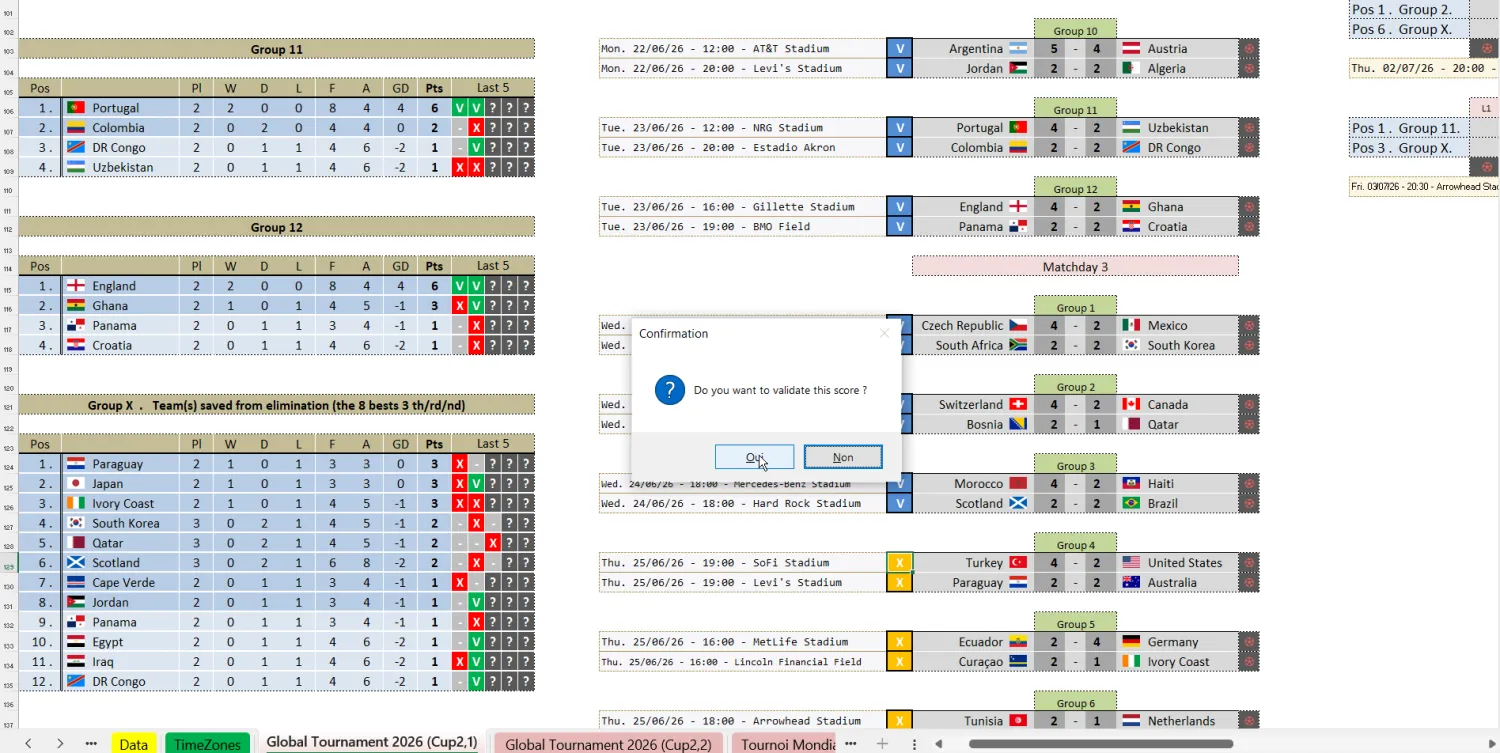
Auto
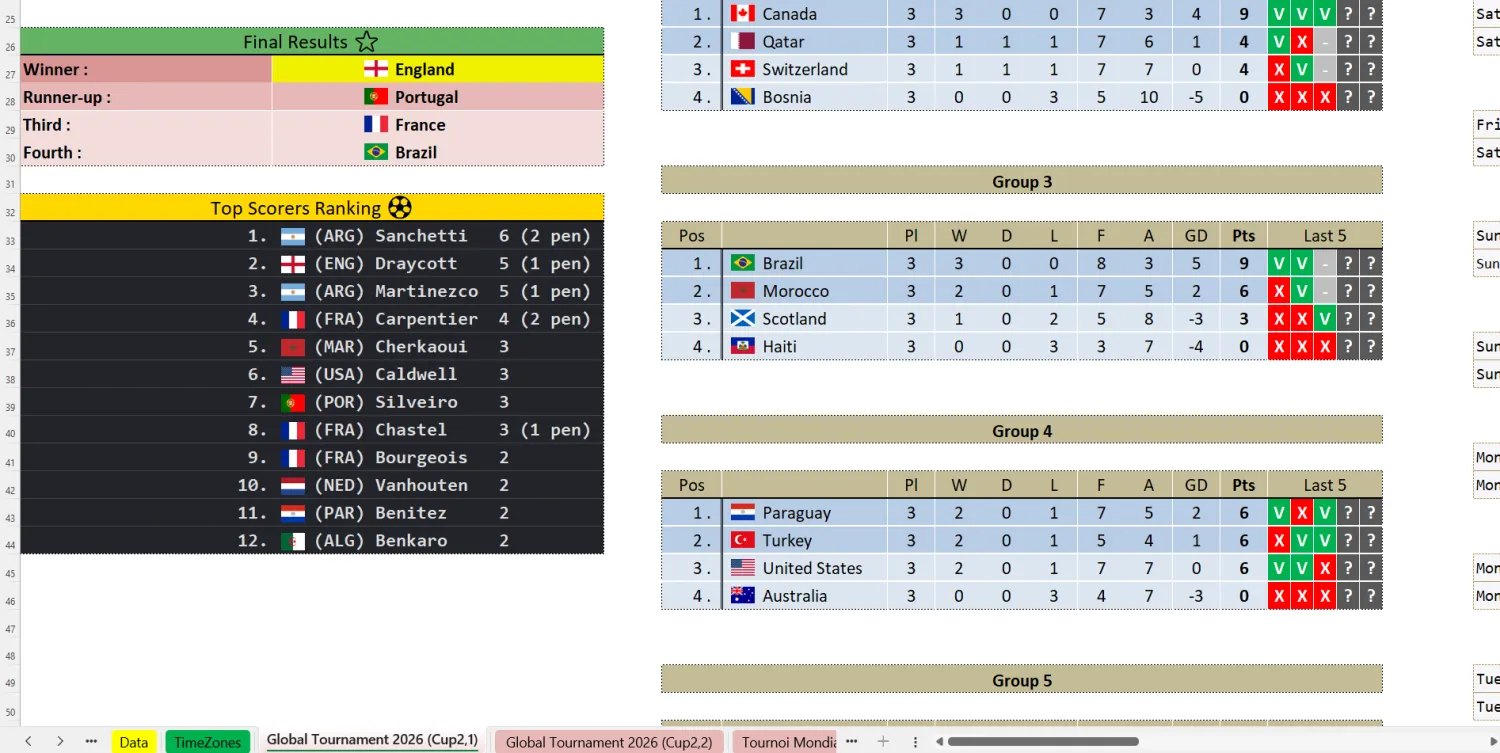
Standings

Team Flags
Display

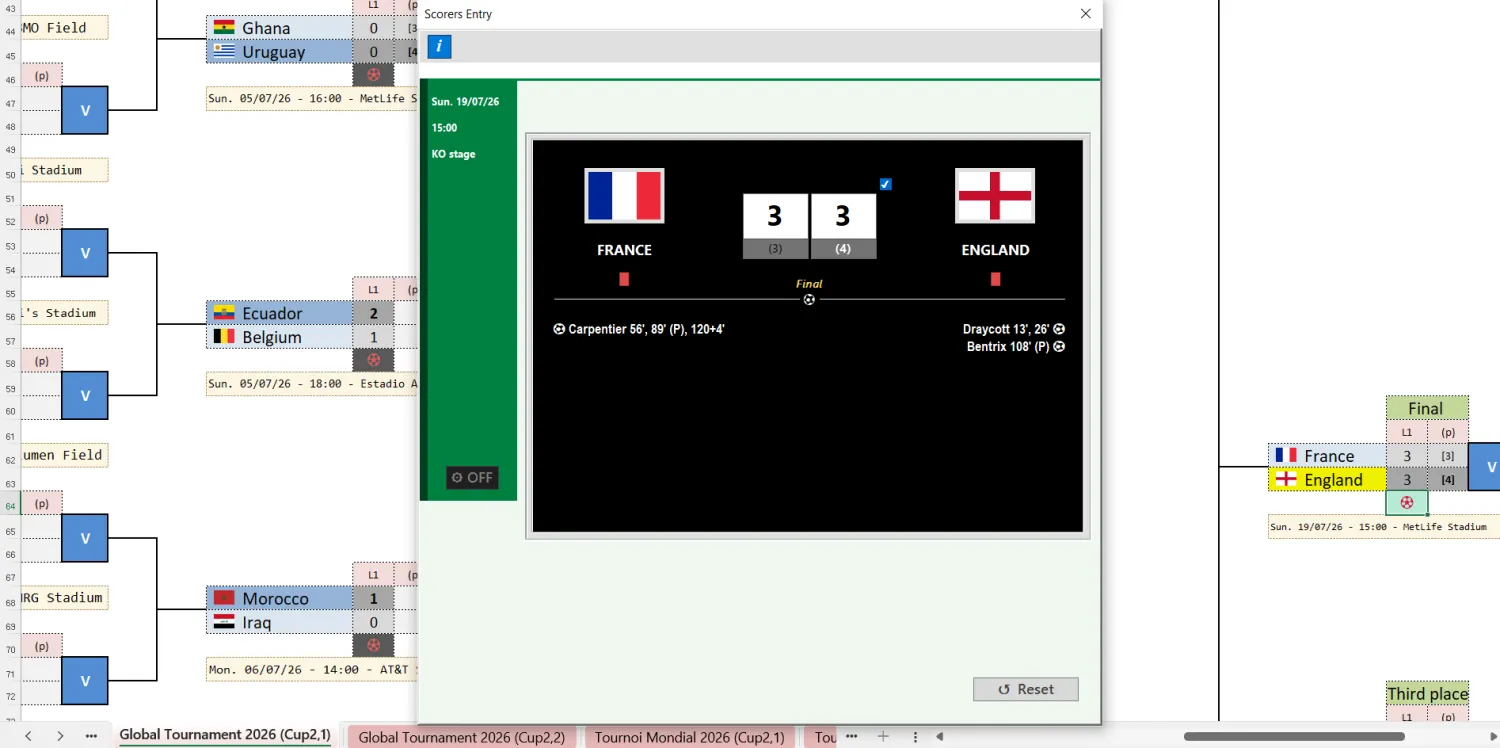
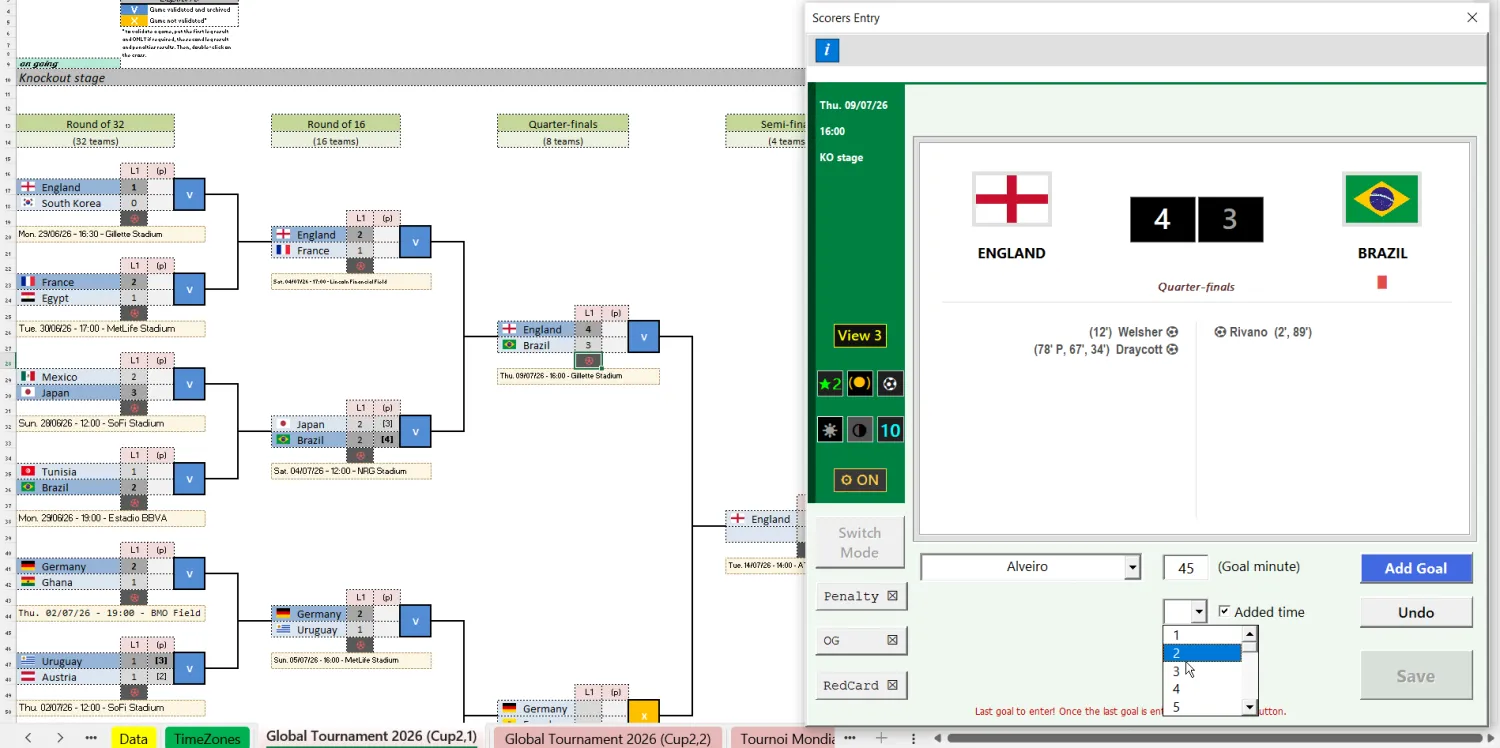
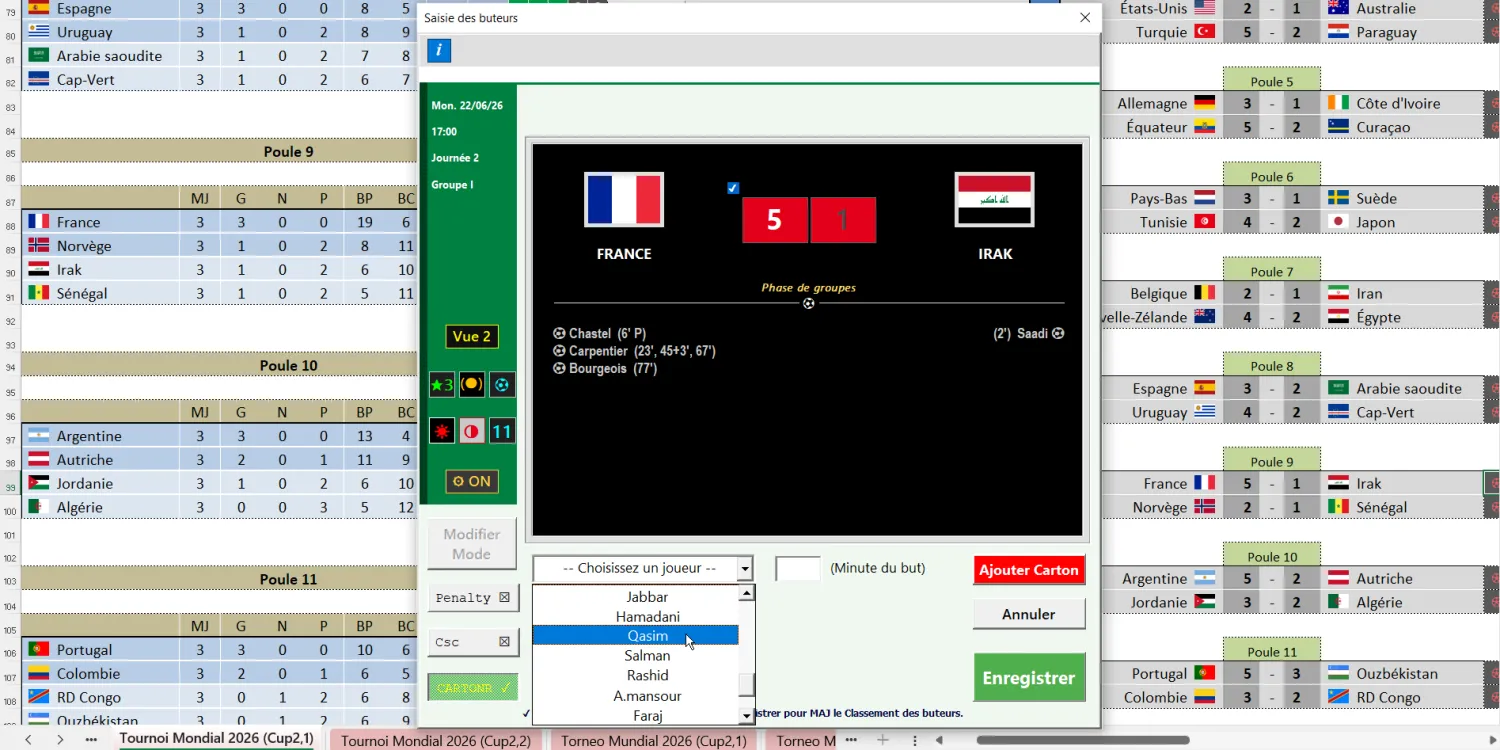
Scorers Entry Interface

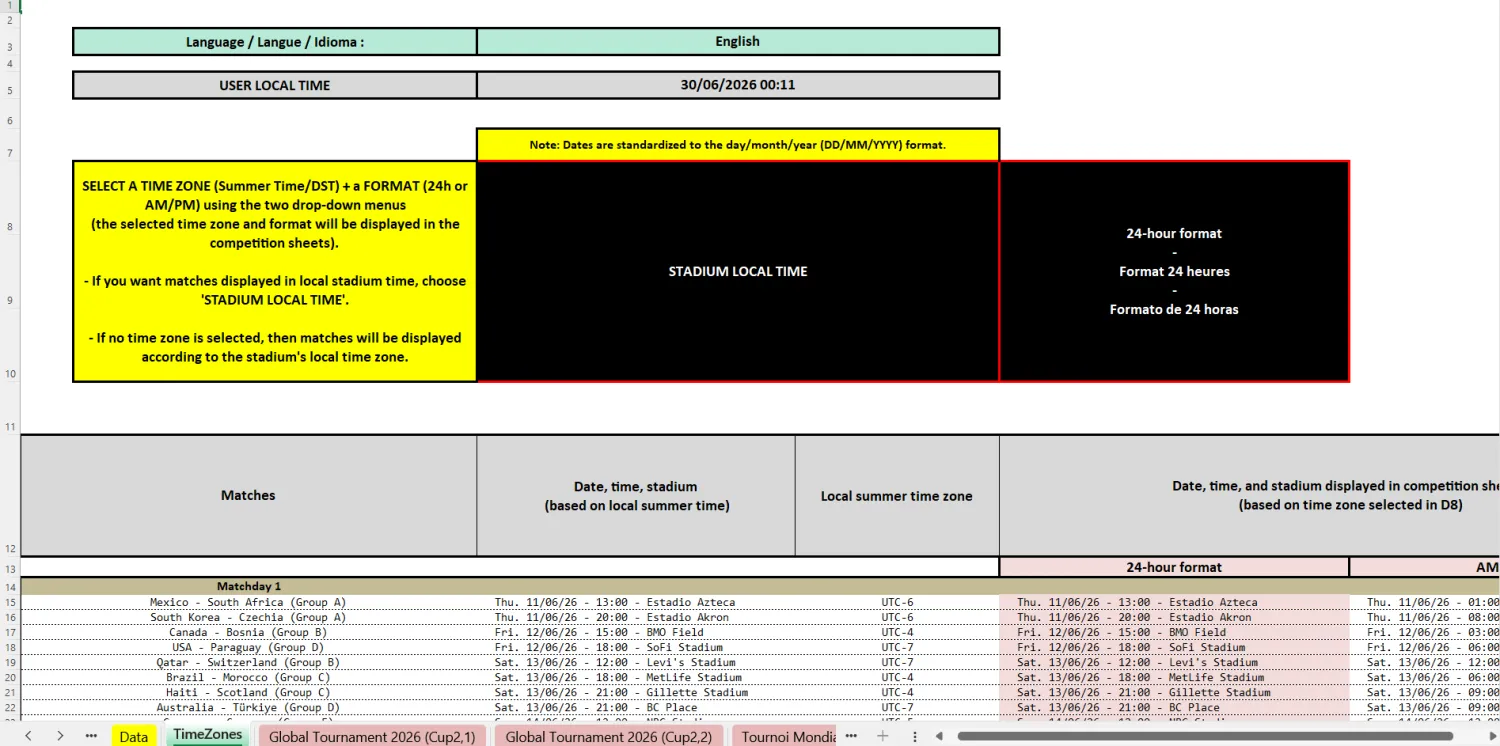
Time Zone
Selector
📦 Product Details
✔ Fully automated Excel spreadsheet
✔ .xlsm macros
✔ Available in English, French & Spanish

📗 TEMPLATE DESCRIPTION
Build and simulate a 48-team football tournament (2026 setup) in Excel from group stage to knockout stage with a fully automated and customizable system, including team flags display.
Score validation system, automatic standings tracking, and instant next-round fixture generation.
Includes scorers & red cards entry, top scorers ranking, time zone selection tool, and fully automated football simulation tools.
Designed for football fans, content creators, tournament organizers, simulation enthusiasts,and football supporters who enjoy predictions and match pronostics, looking for flexible and realistic Excel competition templates.
💻 COMPATIBILITY
Windows PC only
Microsoft Excel required
Compatible with all modern versions of Microsoft Excel, including Microsoft 365, 2021, 2019, and all versions back to 2007.
Works on both 32-bit and 64-bit Excel versions
Not compatible with:
Google Sheets
Microsoft OneDrive
Mobile devices
Alternative spreadsheet software
macOS
🧩 COMPETITION FORMAT
⭐ Group Stage
Simulate a total of 72 matches
• 2026 group stage setup
• Single round-robin format
• 12 groups of 4 teams
• Top two teams per group qualify for the knockout stage
• The 8 best third-placed teams qualify for the knockout stage.
Full 48-team tournament format.
🏆 Knockout Stage
Simulate a total of 32 matches
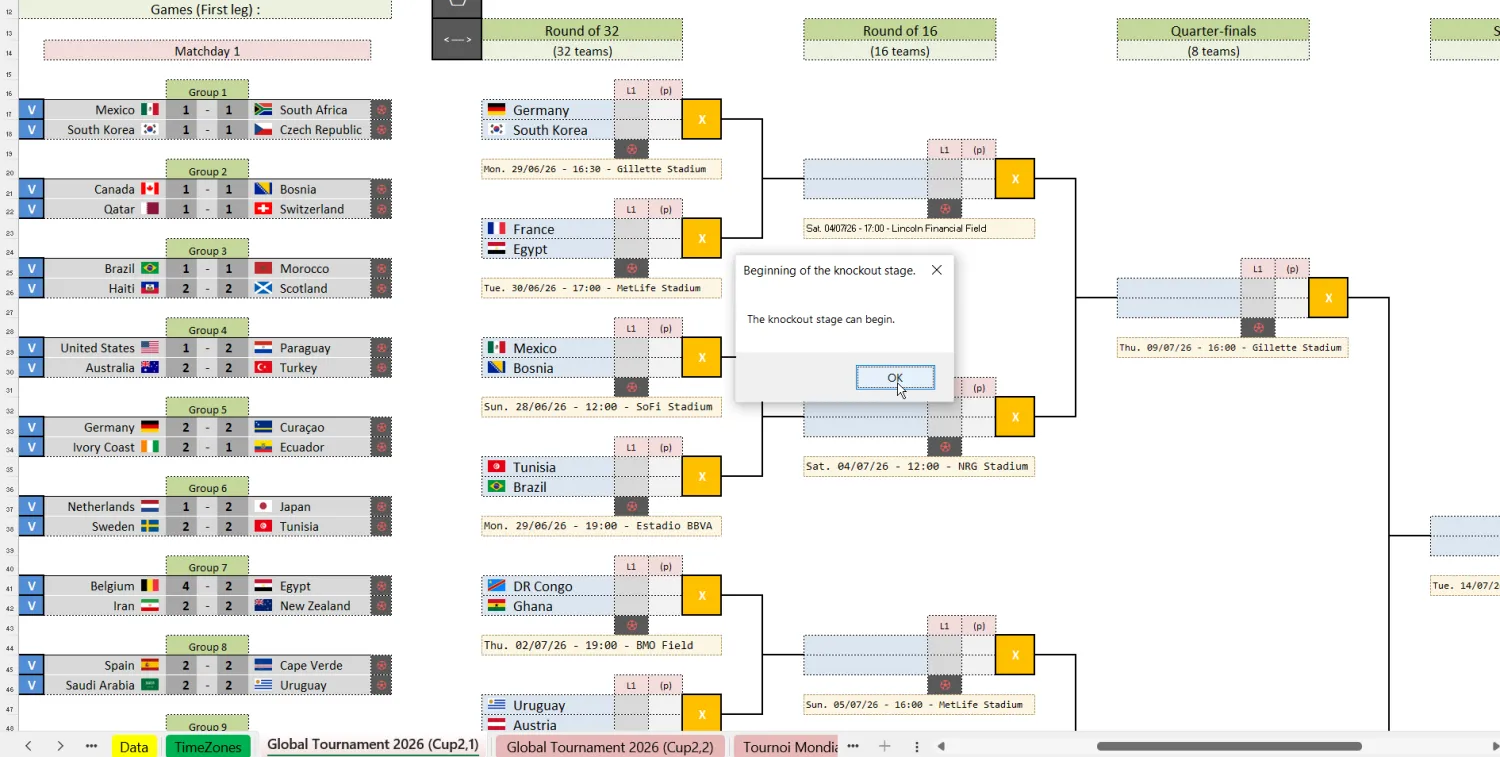
• 2026 knockout bracket setup
• One-legged knockout matches
• Round of 32, Round of 16, Quarter-Finals
• Semi-Finals, Third-Place, Final
• 5 rounds
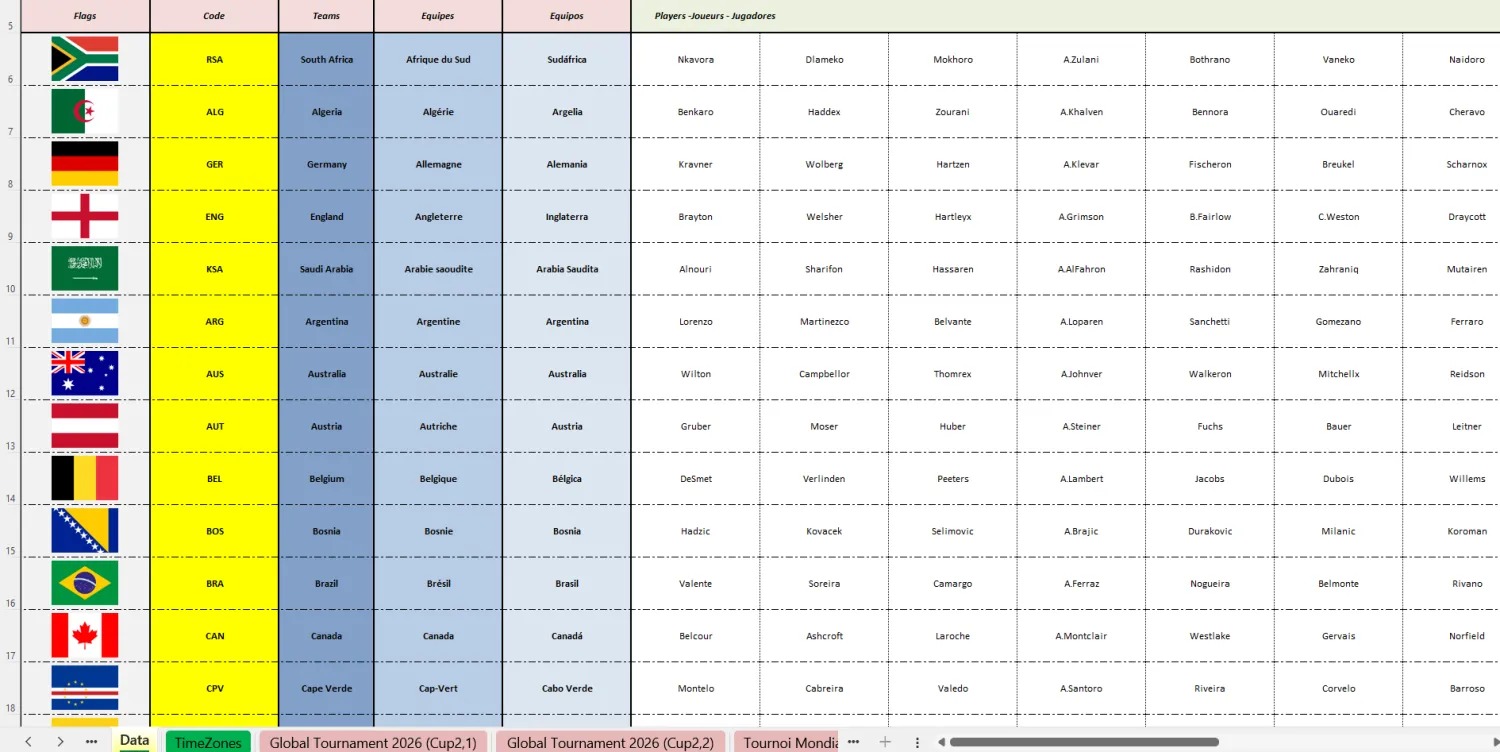
🌍 Time Zone and Player List
Manage match time zones and team rosters
Time Zone (UTC)
• Select your preferred time zone from a dropdown
• 24-hour or AM/PM format
Player list
• Player name input range
• Up to 30 players per team
⚽ Goal Scorers & Red Card Entry Interface
Add goal scorers and track the Top Scorers ranking
• Add goal scorers or red cards, based on:
◦ Entry type (goal or red card)
◦ Player list
◦ Goal type (penalty, own goal)
◦ Goal minute (including added time)
• Track the Top 12 Goal Scorers ranking based on:
◦ number of goals scored,
◦ number of penalties scored,
◦ number of matches played
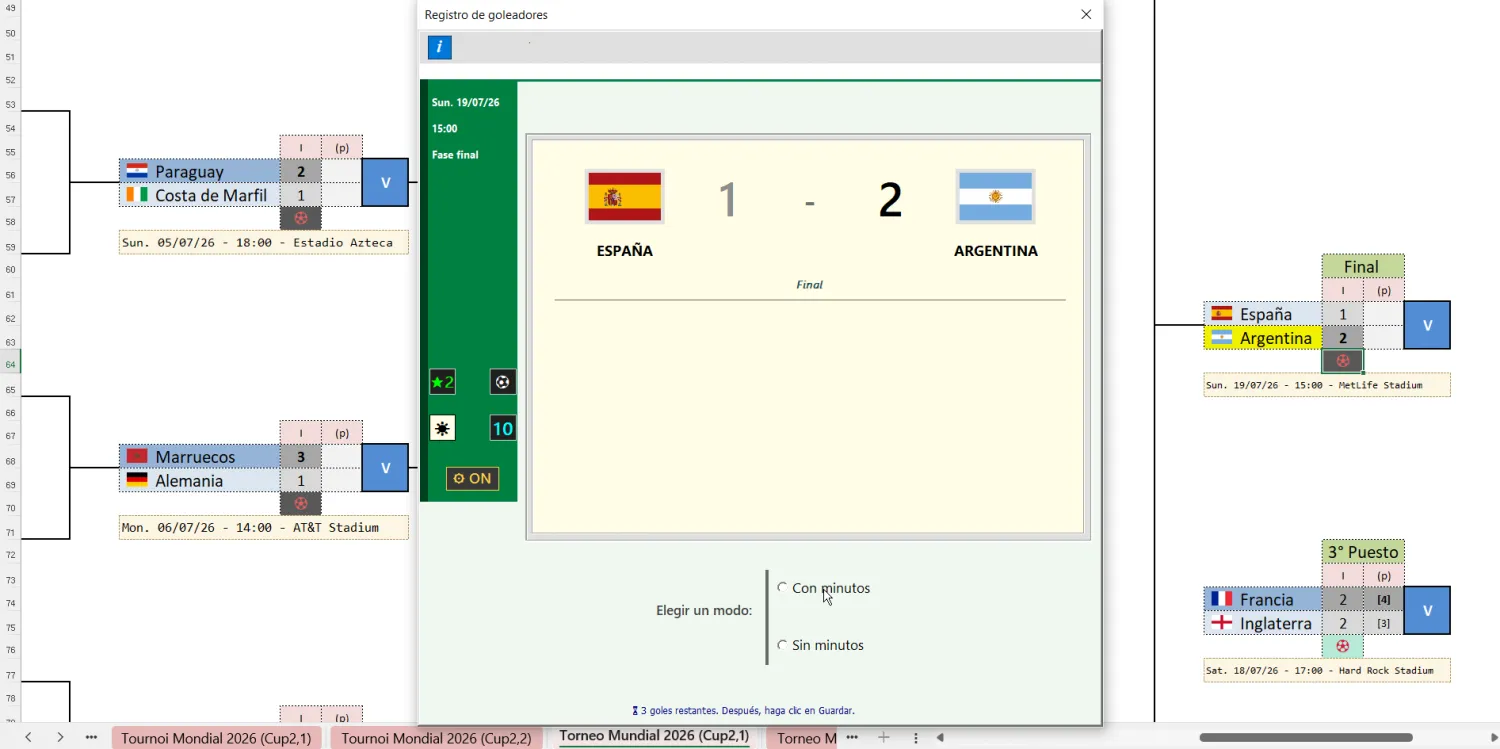
• Display match score, date, time, stadium, competition stage, scorers and red cards in one interface
⚙️ MAIN FEATURES
Total Control from Group Stage to Final.
⭐ Group Stage Features
Default points system (3-1-0)
Automatic group table updates after score validation
A 13th group includes the best third-placed teams
Tie-break management between teams level on points
“Last 5 matches” form tracker
🏆 Knockout Stage Features
Automatic qualification to knockout stage
Replace qualified teams before knockout stage begins
Editable bracket order to ensure correct matchups
Automatic qualification to the next round
Decide matches with penalty shootouts
Third-place game
Away Goal rule OFF
⚽ Goal Scorers & Red Cards Entry Interface Features
Add Scorers or Red Cards
Add goal scorers and red cards in the match interface with two input modes: with or without minutes
Choose goal type:
• Penalty
• Own Goal
Select scorers from a dropdown
Add goal minute (1' to 120') (optional)
Add added time if the minute is 45', 90', or 120' (optional)
Save goal and add the next one
Add red card
Automatic Top Scorers Ranking Updates
Interface Design
9 views for with-minutes mode
9 views for without-minutes mode
9 color combinations (white, grey, yellow, black & white, black & red)
Parentheses around minutes (ON/OFF)
Up to 4 font colors (white, grey, black)
27 font sizes
6 score display modes
Balloon emoji (ON/OFF)
Automatic design settings saving
⚙️ SYSTEM FEATURES
Languages available:
• English (1 worksheet)
• French (1 worksheet)
• Spanish (1 worksheet)
• Language selection directly from a drop-down menu
Smart error-handling system
• Avoid common setup mistakes and keep your competitions running smoothly.
Built-in help messages
Intuitive notifications
Protected cells to prevent accidental errors or spreadsheet malfunction
⚙️ GENERAL FEATURES
Optional score cancellation system
Optional score confirmation system
Optional result explanation after score validation
Clean and professional football-style interface
📦 Digital Product Information
This product is a digital download.
Due to the nature of digital products, refunds, returns, exchanges, or cancellations cannot be accepted once the files have been delivered.
Please make sure to check compatibility requirements before purchasing.
🛡️ Macro Automation – Fast & Seamless Experience
This spreadsheet uses VBA macros to automate every stage of competition management, making football tournament creation and simulation faster, easier, and more reliable.
The automation allows you to:
save significant time compared to manual setup,
generate competitions instantly,
validate scores with a single click,
automatically update standings and knockout progression,
eliminate manual calculations,
reduce setup errors.
As long as you download our files directly from our website, we guarantee that the spreadsheets are safe and free from harmful content.
FAQ
Once your purchase is confirmed, you will automatically receive an email containing:
1 Excel Spreadsheet (.xlsm) – Works on both 32-bit and 64-bit Excel versions
PDF “FIRST USE GUIDE” – step-by-step setup instructions
After purchase, you will receive an email with download links.
Simply click the links and download your files directly to your device.
Please note that the email may take a few minutes to arrive.
If you do not see the email, please check your spam or promotions folder.
This is a 100% digital product.
• No physical item will be shipped
This product is designed for Microsoft Excel on Windows only.
• Compatible with Excel 2007 and newer (32-bit & 64-bit)
• Not compatible with Google Sheets
• Not compatible with Excel Online (OneDrive)
• Not compatible with mobile devices
No installation is required, you just need to have Microsoft Excel
• Follow the included “FIRST USE GUIDE” to enable macros
• Open the file in Microsoft Excel
• You are then ready to use the spreadsheet
Yes!
Our spreadsheets are beginner-friendly, intuitive, and designed to be easy to use, even for people with little or no Excel experience.
In most cases, you will simply need to:
• Click buttons
• Add teams
• Enter scores
Everything else is automated.
Additionally:
• Built-in HELP buttons are available throughout the spreadsheets
• Automatic guidance messages are displayed during usage
• Instructions are included in the "LC Generation Apps" worksheet
• Tutorial videos are available on our YouTube channel or on our Tutorial Videos page
If you have any questions, we are always happy to help.
Yes!
All of our spreadsheets include instructions to help you get started quickly and easily.
• Instructions are included in the "LC Generation Apps" worksheet
• Built-in HELP buttons are integrated throughout the spreadsheets
• Automatic guidance messages are displayed during usage
• Tutorial videos are available on our YouTube channel or on our Tutorial Videos page
Yes.
As long as you download our files directly from our website, we guarantee that our spreadsheets and PDF files are safe, harmless, and free from malicious content.
Our files do not contain viruses, attacks, or harmful software that could damage your device or steal personal information.
Macros are automation tools built into Microsoft Excel that allow spreadsheets to perform actions automatically.
We use macros to automate the competition management process, including:
• Automatic standings updates
• Automatic knockout progression
• Competition generation
• Score validation
• Various automated calculations and actions
Our spreadsheets use the .xlsm format, which requires macros to be enabled in Excel.
Enabling macros is simple and only takes a few seconds.
To help you, every purchase includes a PDF called “FIRST USE GUIDE” containing step-by-step instructions for enabling macros in Microsoft Excel.
As long as you download our files directly from our website, we guarantee that our spreadsheets are safe and harmless to your device.
You can also learn more about macros on the official Microsoft Excel website.
🗣️
Our spreadsheets include 3 languages:
• English
• French
• Spanish*
Those languages are included in the same spreadsheet.
*Spanish content has been partially auto-translated.
Basic Spanish is available in the main interfaces and some instructions, but built-in help messages are only available in English or French.
Due to the nature of digital products:
• All sales are final
• No refunds, returns, or exchanges are possible once the files are delivered
Please ensure compatibility before purchasing.
If you have any additional questions, please use the contact form available on our Contact page or email us directly at: lc.generation.pro.ecommerce@gmail.com
🔒 Secure Payments 🔒


Disclaimer: This website and its contents are unofficial and independent. They are not affiliated with, endorsed by, or sponsored by any league, federation (including FIFA or UEFA), club, or competition organizer. All tournament, league, and player names are used for descriptive and identification purposes only.
FOLLOW US

LEGAL INFO
FOLLOW US


Copyright © 2023-2026 LC Generation | All Rights Reserved